Docs / Quickstart
Quickstart
Send your first event and see your first root cause in about five minutes.
1. Create a project and get an API key
- Sign up — no card required.
- A project and an ingest key are created for you automatically.
- Copy your key from Settings → API Keys. It's shown once.
export SCRYWATCH_API_KEY="sk_live_xxxxxxxxxxxxxxxx"2. Send your first event
One HTTPS call. No agent, no SDK required.
curl -X POST https://api.scrywatch.com/api/ingest \
  -H "Authorization: Bearer $SCRYWATCH_API_KEY" \
  -H "Content-Type: application/json" \
  -d '{
    "events": [
      {
        "level": "error",
        "type": "log",
        "message": "Checkout failed: payment provider timeout",
        "service": "checkout-api",
        "environment": "production",
        "session_id": "sess_8c2f",
        "user_id": "user_4471",
        "metadata": { "order_id": "ord_99213", "provider": "stripe" }
      }
    ]
  }'
You'll get a 202 Accepted. Your event is queued and appears in seconds.
{ "accepted": 1 }Field reference
| Field | Required | Notes |
|---|---|---|
| level | yes | debug · info · warn · error |
| type | yes | log · crash · event |
| message | yes | The human-readable line. Fingerprinted automatically. |
| service | – | e.g. checkout-api. Powers facets and Deploy Diff. |
| environment | – | e.g. production, staging. |
| session_id | – | Ties events into a replayable session. |
| user_id | – | Filter and group by user. |
| timestamp | – | ISO 8601 or epoch ms. Defaults to receive time. |
| metadata | – | Any JSON object. Searchable. |
Send up to 50 events per request. Just keep posting batches.
3. See it land
Open Search. Filter by service: checkout-api
and notice it's already grouped into a pattern — the variable bits (order IDs, timeouts)
are tokenized so the same failure always groups together.
4. Find your first root cause
This is the point of ScryWatch.
Mark a deploy — from the dashboard or your CI:
curl -X POST https://api.scrywatch.com/api/orgs/<org>/projects/<project>/deploys \
  -H "Authorization: Bearer $SCRYWATCH_API_KEY" \
  -H "Content-Type: application/json" \
  -d '{ "service": "checkout-api", "environment": "production", "version": "v1.4.2" }'
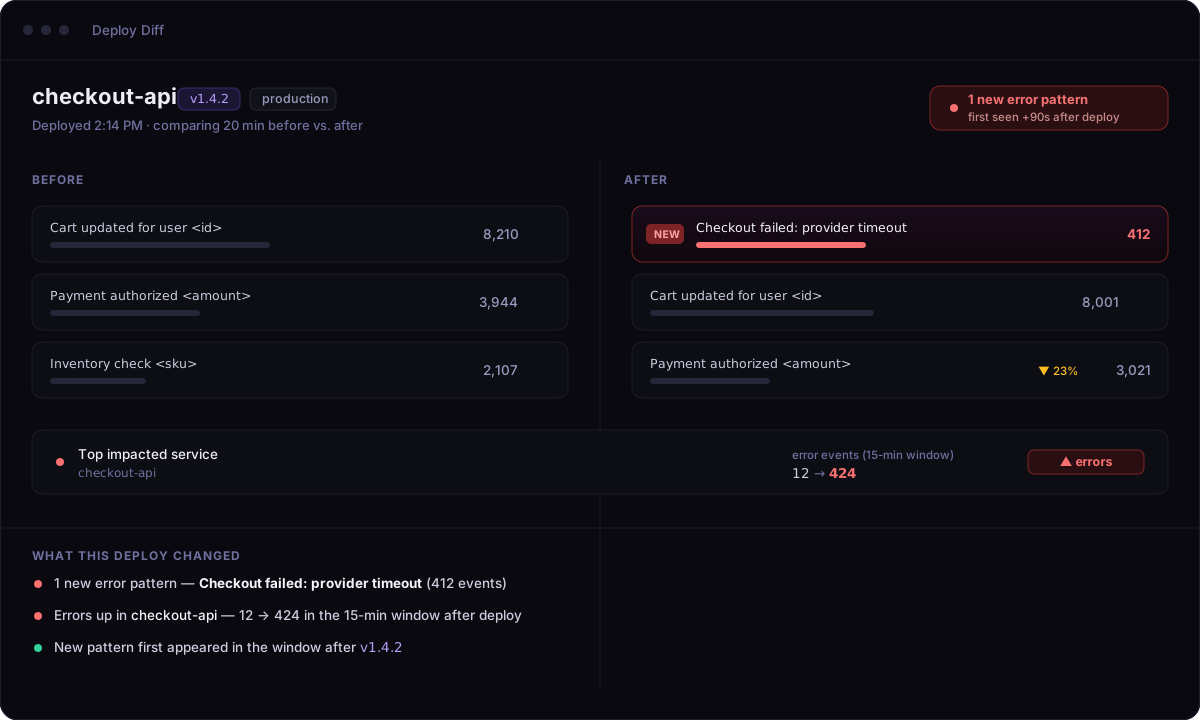
Send a few more errors, then open Deploy Diff for v1.4.2.
You'll see production behavior before vs. after — the new error pattern, how often it's firing, and the issue it rolled up into.
5. Connect your AI assistant (optional)
Let Claude or Cursor query everything above, read-only. Connect your assistant →
Next steps
- The production graph — how fingerprinting connects every signal
- Issues · Patterns · Deploy Diff
- Connect your AI assistant